 Sideline
 PicPortal
 CodeReplacements.ai
 Renamr
Wireless Camera Tethering for Sports Photography
No cable? No problem.
Sideline unlocks wireless camera tethering for sports photography so you can get your photos out faster. No memory cards, no dongles, no waiting.
500 free AI captions · 14-day full access · $0 today · Cancel anytime
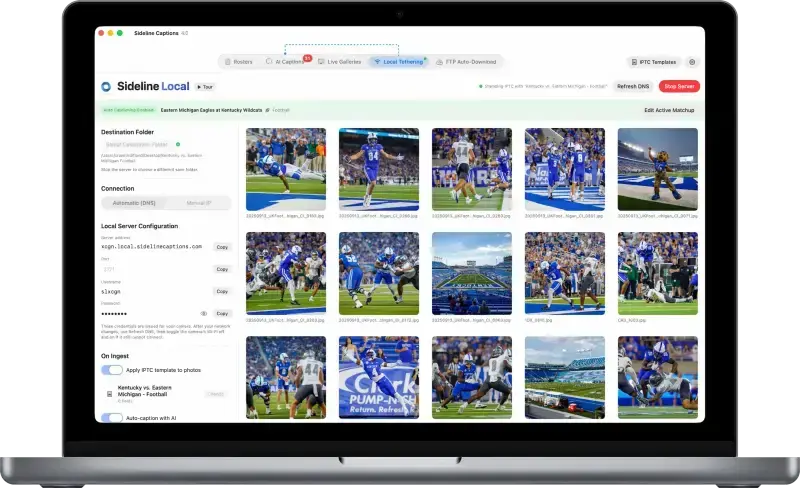
Sideline Local
Wireless tethering that doesn't suck.
Stop hunting for dongles or wrestling with your camera's default connect app. Sideline Local puts your images on your Mac, iPhone, or iPad within seconds of the shutter firing.
Features
Image transfer made easy.
Stop hunting for dongles or using your camera's default camera connect app. Sideline Local puts your images on your device within seconds of the shutter firing.
Instant wireless transfer
Images land on your Mac, iPhone, or iPad the moment you send them. No cables, no card readers, no delay — just a seamless flow from camera to device.
Works on Wi-Fi or Hotspots
Just connect your camera and iOS device to the same Wi-Fi network or hotspot to transfer photos.
Mac, iPhone, and iPad
Run Sideline Local on your Mac for a full editing workflow, or tether directly to your iPhone or iPad for quick social media posts while the game is still going.
Auto-stamp IPTC metadata
Every photo that arrives gets your IPTC metadata automatically embedded — photographer name, copyright, contact info, and more — before it ever hits your editing app.
Seamless Sideline integration
On Mac, photos arrive directly into your Sideline Captions watch folder, so your AI captioning picks them up automatically — no extra steps.
All major camera brands
Compatible with Canon, Nikon, Sony, Fujifilm, and more. If your camera has built-in Wi-Fi or a wireless transmitter, Sideline Local works with it.
Frequently Asked Questions
Good Questions, Straight Answers.
What is Sideline Local?
Sideline Local is wireless camera tethering that transfers photos from your camera to your Mac, iPhone, or iPad the moment you shoot — no memory cards, no cables, no dongles. On Mac, photos can flow directly into your Sideline Captions watch folder for automatic AI captioning.
Do I need internet for Sideline Local?
Yes. Your camera and device (Mac, iPhone, or iPad) must be on the same Wi-Fi network. That can be arena Wi-Fi, venue Wi-Fi, your phone's hotspot, or a personal hotspot — whichever works best on gameday. When venue Wi-Fi is overloaded or unreliable, many photographers use their own hotspot instead.
Which cameras work with Sideline Local?
Sideline Local works with Canon, Nikon, Sony, Fujifilm, and other major brands — any camera with built-in Wi-Fi or a wireless transmitter. Learn more about Sideline Local.
Pricing
Everything your workflow needs.
One price.
Everything you used to pay for separately — bundled into one app.
Save 17% with yearly billing
Free Trial
Free for 14 days
Get 500 AI-generated captions for free, plus a 2-week free trial of Sideline Live
-
AI Captioning for macOSAI-generated captions for sports photographyIntelligent AI captioning in all styles Local folder watching Filtering & post-captioning actions Caption Review Manual roster creation Roster Manager
Export rosters & matchupsFTP Mode -
Roster GeneratorRoster data for 1.6M+ athletes16 sports, 340+ leagues, 116,000+ teams, 1.6M+ players
-
Sideline LiveSideline Live Photo GalleriesReal-time photo galleries delivered in secondsUnlimited galleries & images Password-protected galleries Sell your images & earn Photographer profile pages Protect your images with a watermark Custom domains & branding Advanced analytics 10GB of storage included
-
Sideline LocalWireless tethering that doesn't suckWireless tethering to Mac, iPhone, or iPad Auto-stamp photos with IPTC templates Works when venue Wi-Fi is overloaded
-
Sideline WireAuto-download from FTP serversAuto-download files from remove FTP servers Auto-stamp photos with IPTC templates Auto-caption new photos Designed for remote editors and newsrooms
Sideline Captions
$14.99/month
Choose the plan that's right for you.
Save more when you pay yearly.
-
AI Captioning for macOSAI-generated captions for sports photographyIntelligent AI captioning in all styles Local folder watching Filtering & post-captioning actions Caption Review Manual roster creation Roster Manager Export rosters & matchups FTP Mode
-
Roster GeneratorRoster data for 1.6M+ athletes16 sports, 340+ leagues, 116,000+ teams, 1.6M+ players
-
Sideline LiveSideline Live Photo GalleriesReal-time photo galleries delivered in secondsUnlimited galleries & images Password-protected galleries Sell your images & earn Photographer profile pages Protect your images with a watermark Custom domains & branding Advanced analytics 10GB of storage included
-
Sideline LocalWireless tethering that doesn't suckWireless tethering to Mac, iPhone, or iPad Auto-stamp photos with IPTC templates Works when venue Wi-Fi is overloaded
-
Sideline WireAuto-download from FTP serversAuto-download files from remove FTP servers Auto-stamp photos with IPTC templates Auto-caption new photos Designed for remote editors and newsrooms
Enjoy wireless freedom.
Don't let slow card readers, dongles, or default camera apps hold you back. Get your photos out faster with Sideline Local.
500 free AI captions · 14-day full access · $0 today · Cancel anytime