 Sideline vs. Renamr
NCAA Men's Division I Code Replacements
Ready-to-go code replacement files for every NCAA Men's Division I team (57 teams). Pick a matchup, choose AP, Getty, or Imagn style, and download a ready-to-use .txt — or let Sideline Captions write the captions for you.
New user? Your first file is free:
What's inside
What's in our NCAA Men's Division I code replacement files
- All 57 teams
- Caption Styles for AP / Getty / Imagn
- 26 common phrases for volleyball
Pick a matchup below to preview real NCAA Men's Division I code lines in AP, Getty, or Imagn style.
Code Replacement files
for all 57 NCAA Men's Division I teams
- American Int'l
- Ball St.
- Barry
- Barton
- Benedict
- BYU
- Catawba
- Central St. (OH)
- Charleston (WV)
- CSUN
- CUI
- D'Youville
- Dominican (NY)
- Edward Waters
- Emmanuel (GA)
- Erskine
- FDU
- George Mason
- Grand Canyon
- Harvard
- Jessup
- Kentucky St.
- King (TN)
- Lees-McRae
- LeMoyne-Owen
- Lewis
- Lindenwood
- LIU
- Long Beach St.
- Maryville (MO)
- McKendree
- Menlo
- Merrimack
- Missouri S&T
- Morehouse
- Mount Olive
- NJIT
- North Greenville
- Ohio St.
- Princeton
- Purdue Fort Wayne
- Queens (NC)
- Quincy
- Roberts Wesleyan
- Rockhurst
- Roosevelt
- Sacred Heart
- Saint Francis
- Southern California
- Stanford
- Thomas More
- Tusculum
- UC Irvine
- UC San Diego
- UC Santa Barbara
- UCLA
- Vanguard
Caption styles
AP Sports, Getty, Imagn, and more — the formats editors expect from wire photographers.
Multiple tab codes
Optional variants so one shortcode can expand to full name, last name only, or other tab-separated fields.
Common phrases
Add sport-specific action codes — runs, tackles, passes — alongside player entries in the same file.
Upcoming games
Pick a game from the calendar and Sideline auto-fills both teams — no hunting through dropdowns on game day.
AI captions next
Use the same rosters in Sideline Captions to AI-caption images automatically on ingest.
Common Volleyball Phrases
Convenient common phrases for volleyball – included
Add these shortcodes alongside player entries in the same file.
| Code | Phrase |
|---|---|
srv |
serves the ball |
spk |
spikes the ball |
set |
sets the ball |
batn |
blocks at the net |
dtb |
digs the ball |
| plus 21 more for volleyball… |
FAQ
NCAA Men's Division I roster & captioning FAQ
Where can I download NCAA Men's Division I code replacements?
Right here. Pick any matchup across all 57 teams, choose AP, Getty, or Imagn style, and download a ready-to-use .txt file. Your first file is free, and a Sideline Captions trial unlocks unlimited code replacement files.
How do I use NCAA Men's Division I code replacements in Sideline Captions?
Open Sideline Captions and pick the NCAA Men's Division I matchup in Roster Manager — the roster is already loaded. Type a shortcode in the caption editor to expand a player, or turn on AI captioning and let Sideline caption each image as it lands. Already have your own code file? Import it into Roster Manager.
Which caption styles are supported?
AP, Getty, Getty (parentheses), and Imagn. When you download Sideline Captions for macOS, you can also unlock custom caption styles that let you name players in whatever style fits your workflow.
Can Sideline AI-caption my NCAA Men's Division I photos?
Yes. The same rosters you build here power Sideline Captions on macOS. Point it at a folder of game images and it reads jersey numbers, matches players from your roster, and writes publication-ready captions in AP, Getty, or Imagn style — no shortcodes to type.
Should I use code replacements, AI captions, or both?
Code replacements are great when you're captioning by hand and want instant player names from shortcodes. AI captioning shines when you need to get through a full card fast — Sideline writes the entire caption from the image and roster. Both are included in one Sideline subscription.
Automated Sports Photography Captioning
Caption NCAA Men's Division I games faster with
Sideline Captions
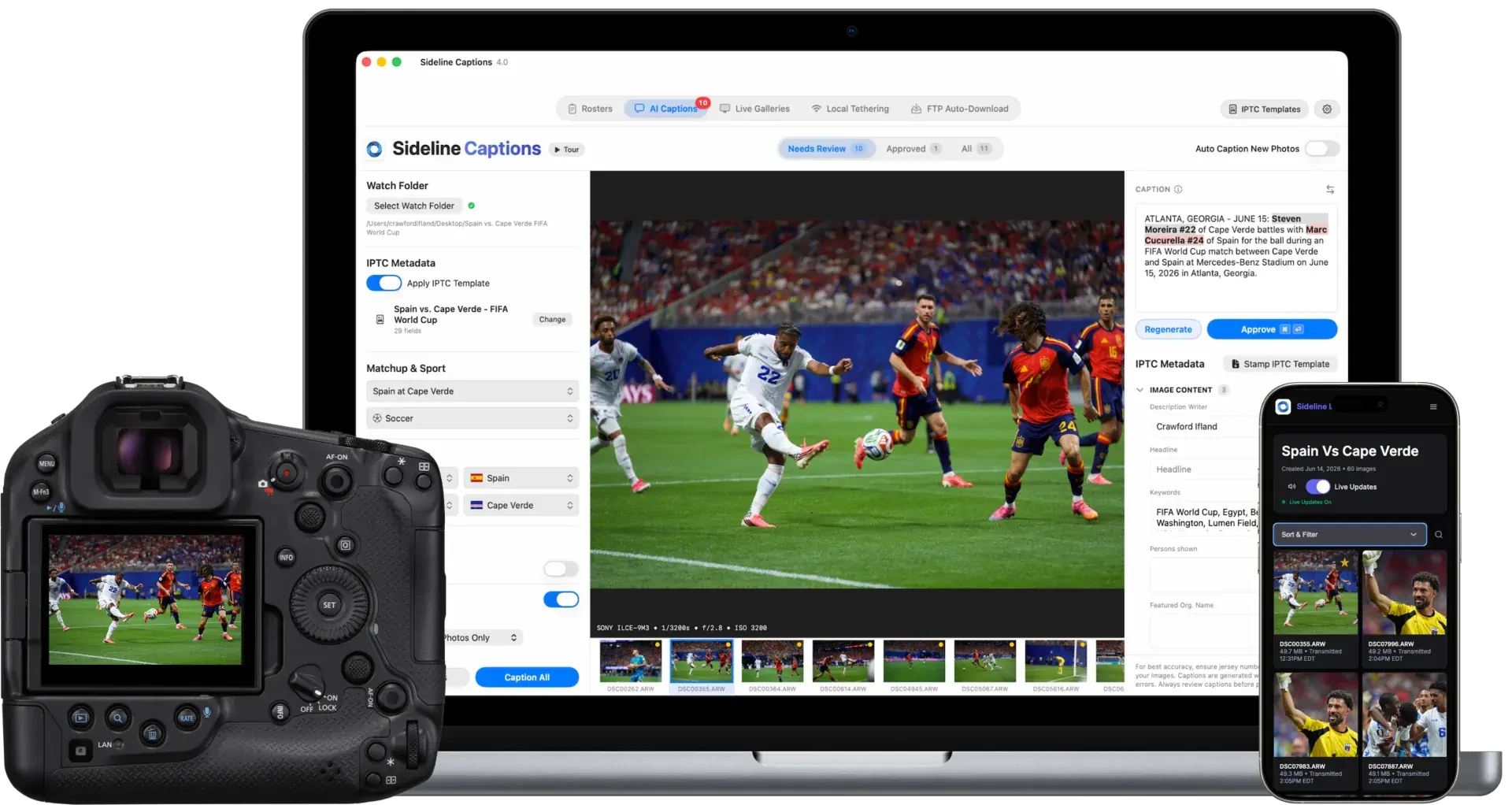
Same roster, no file to manage.
Every NCAA Men's Division I roster on this page is already inside Sideline Captions. Pick the matchup in the app and you're ready.
AI captions on ingest.
Sideline watches your ingest folder, reads jersey numbers, matches players from the NCAA Men's Division I roster, and writes AP, Getty, or Imagn captions in about 2.5 seconds per image.
Your codes still work.
Code replacements are built into Sideline's caption editor, and you can import existing code replacement files into Roster Manager.
Rosters are just the start.
Sideline Captions includes NCAA Men's Division I code replacements, unlimited AI sports captions, Sideline Live galleries, and more — $14.99/month.
Everything included · $14.99/month · Cancel anytime