What Are Photo Mechanic Code Replacement Files?
If you shoot sports, Photo MechanicTM code replacement files are one of the most important — and most misunderstood — tools in your workflow.
They're the reason some photographers can caption hundreds of images in minutes, while others are still typing player names as deadlines hit.
This guide explains:
- What Photo Mechanic code replacement files are
- How they actually work in Photo Mechanic
- Why they matter so much for sports photography
- Their limitations (and where modern tools go further)
What Are Photo Mechanic Code Replacement Files?
Code replacements are simple text shortcuts that expand into longer text automatically inside Photo Mechanic.
You type a short code — usually a jersey number, initials, or abbreviation — and Photo Mechanic instantly replaces it with a full name, role, or phrase.
Example:
| You type | It becomes |
|---|---|
k |
Kentucky Wildcats |
ak |
against the Kentucky Wildcats |
n |
North Carolina Central Eagles |
an |
against the North Carolina Central Eagles |
btw |
between the Kentucky Wildcats and the North Carolina Central Eagles |
k00 |
Kentucky Wildcats guard Otega Oweh (00) |
k1 |
Kentucky Wildcats guard Denzel Aberdeen (1) |
k2 |
Kentucky Wildcats guard Jasper Johnson (2) |
k3 |
Kentucky Wildcats guard Kam Williams (3) |
k4 |
Kentucky Wildcats forward Andrija Jelavic (4) |
k5 |
Kentucky Wildcats guard Collin Chandler (5) |
k9 |
Kentucky Wildcats forward Trent Noah (9) |
k10 |
Kentucky Wildcats forward Brandon Garrison (10) |
khc |
Kentucky Wildcats head coach Mark Pope |
k11 |
Kentucky Wildcats guard Walker Horn (11) |
k15 |
Kentucky Wildcats guard Jaland Lowe (15) |
For sports photographers, this allows you to:
- Caption faster under deadline
- Avoid spelling mistakes, especially for unusual player names
- Stay consistent across hundreds of images
- Reduce mental load while editing
Want to generate Photo Mechanic code replacement files automatically? Sideline's Roster Generator creates ready-to-use files for 250+ leagues, 110,000+ teams, and 1.6M+ players in seconds.
Why Sports Photographers Rely on Photo Mechanic Code Replacement Files
Sports captioning has unique challenges:
- Large rosters
- Duplicate jersey numbers
- Constant substitutions
- Tight deadlines
- Editorial standards (AP, Getty, Imagn)
Typing names manually doesn't scale.
Code replacement files let you:
- Think in numbers, not names
- Caption while culling
- Work faster without sacrificing accuracy
That's why Photo Mechanic code replacement files became standard long before AI captioning existed.
How Code Replacement Files Work in Photo Mechanic
At a technical level, a code replacement file is just a plain text file.
Each line contains:
- A code
- A replacement
Photo Mechanic reads the file line-by-line and watches for shortcuts as you type.
Instead of building these files manually, you can generate them automatically from roster data using tools like Sideline's Roster Generator, which pulls from your Roster Manager to create perfectly formatted files in seconds.
Example Photo Mechanic code replacement file
cb23 |
Chicago Bulls guard Michael Jordan (23) |
uk8 |
Kentucky Wildcats quarterback Cutter Boley (8) |
mv9 |
J.J. McCarthy #9 of the Minnesota Vikings |
Once loaded into Photo Mechanic:
- Typing
#12expands instantly - The replacement works in captions, IPTC fields, and keywords
- No internet connection is required
This simplicity is also why code replacement files are fast — and fragile.
What Code Replacement Files Are Commonly Used For
In sports photography, Photo Mechanic code replacement files typically cover:
1. Player Names
- Jersey number → full name
- Most common use case
2. Coaches & Staff
HC,AC,GK,REF- Useful for bench shots and sidelines
3. Repeated Phrases
- Team names
- Venue names
- Game descriptions
4. Position Labels
- QB, RB, WR, F, G, D
- Often combined with names
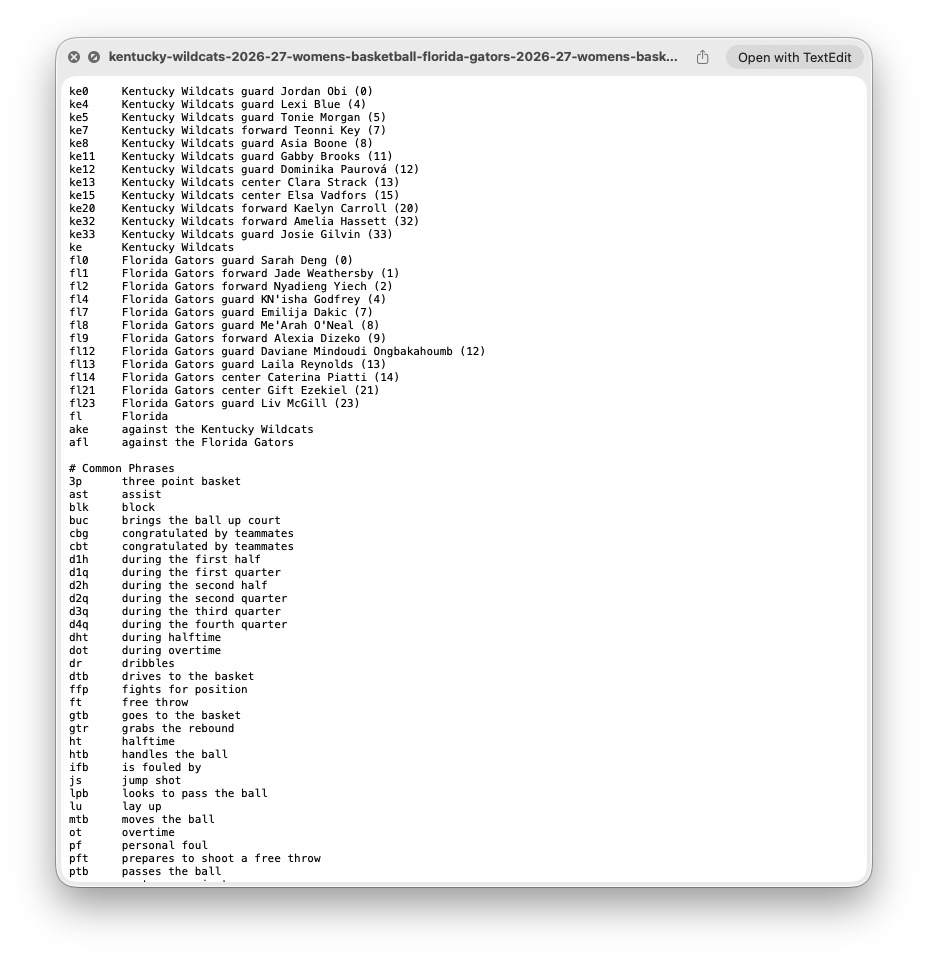
Example of a Photo Mechanic code replacement file
The Strengths of Code Replacement Files
Code replacement files are popular for good reasons:
- ✅ Extremely Fast — No lag. No processing. No API calls.
- ✅ Offline — They work anywhere — stadiums, gyms, rural fields.
- ✅ Predictable — What you type is exactly what you get.
- ✅ Editor-Friendly — They fit cleanly into standard IPTC workflows.
The Limitations of Code Replacement Files
This is where many workflows break down.
- ❌ Manual Setup — You have to build the file, format it correctly, and update it for every game. This is why many photographers use automated tools like Sideline's Roster Generator to generate files instantly from roster data.
- ❌ Fragile Formatting — Common failure points include smart quotes, extra spaces, wrong encoding, and missing tabs.
- ❌ Duplicate Numbers — Two players wearing
#12? Now you're guessing — or fixing captions later. - ❌ No Context Awareness — Code replacement files don't know which team is on offense, who scored, or what's happening in the photo. They only expand text. They don't understand the image.
Code Replacement Files vs AI Captioning
This is not an either/or decision. Modern sports workflows use both.
| Code replacement files | AI Captioning |
|---|---|
| Deterministic | Context-aware |
| Manual setup | Automatic |
| Offline | Requires processing |
| Fast | Fast (but review needed) |
Code replacement files ensure accuracy. AI captions add context, grammar, and style.
The key is reviewing and correcting captions efficiently — especially under deadline. Tools like Sideline's Caption Review let you check, edit, and approve every caption without leaving your workflow.
Where Code Replacement Files Fit in a Modern Workflow
A practical 2026 workflow often looks like this:
- Import photos
- Cull aggressively
- Apply AI captions using roster data from your Roster Manager
- Review names and details with Caption Review
- Deliver in real time via Sideline Live galleries
Code replacement files still matter — but they work best when:
- Backed by a structured roster (managed in Roster Manager)
- Combined with review tools like Caption Review
- Not rebuilt manually for every game (generated automatically from roster data)
When Code Replacement Files Alone Are Enough
Stick with traditional Photo Mechanic code replacement files if:
- You shoot small rosters
- Deadlines are forgiving
- You already have clean, reliable files
- You prefer fully manual control
They remain a solid, proven tool.
When You'll Outgrow Them
You'll feel friction when:
- Rosters change frequently
- You shoot multiple sports or teams
- You work live or remote
- You need captions reviewed quickly
- You're delivering during games
That's usually the point where photographers look for:
- Roster-based automation (like Roster Manager and Roster Generator)
- Faster review loops (with Caption Review)
- Fewer manual files to manage
- Live delivery solutions (via Sideline Live)
Final Thoughts
Code replacement files are the foundation of sports photo captioning.
Understanding them deeply makes you faster, more accurate, and more professional — even if you eventually adopt more advanced tools.
If you master Photo Mechanic code replacement files first, everything else in your workflow gets easier.
Ready to streamline your captioning workflow? Sideline Captions combines roster files (Photo Mechanic code replacement files), AI captioning, roster management, and live delivery into one integrated system built for sports photographers on deadline.