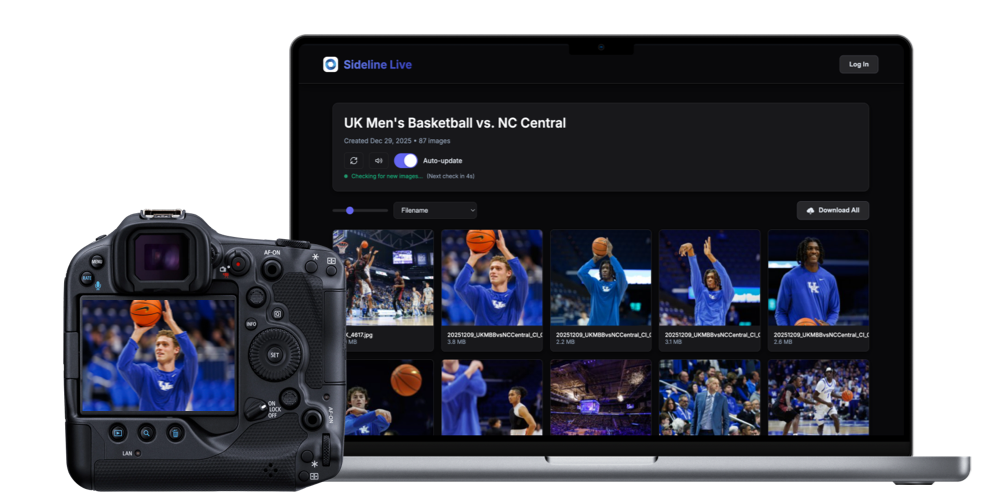
Go from camera to client in seconds with beautiful, password-protected galleries - no FTP servers to setup or maintain.
"I've had trouble setting FTP up in the past, so I had ZERO expectation of this working for me. I've watched every video on YouTube about FTP and have never been able to push out an image. Sideline Live worked on the first try after just a few minutes of setup.
Happy is an understatement!"
— Nolan Keesee, Freelance Sports Photographer

Traditional live-delivery platforms force you to think about things that have nothing to do with photography—servers and connections, folder structures and file paths, sync delays, failed uploads, and the manual steps between shooting and sharing.
All of that overhead adds stress, slows delivery, and pulls your attention away from the moment you’re there to capture.
Sideline Live was built to remove all of that. There’s nothing to configure, nothing to maintain, and nothing to babysit. Photos move straight from camera to gallery, updating automatically in real time as you shoot.
No interruptions. No extra steps. No surprises.
The result? Faster delivery, happier clients, and more time spent doing what actually matters—shooting, not troubleshooting.
Photographers switch to Sideline Live because it feels invisible. And that’s exactly the point.
Sideline Live lets you deliver photos in real-time. No hassles. No waiting. No FTP servers to configure or maintain. Just instant galleries your clients love.
Create a Sideline Live gallery and set a username and password.
Enter the credentials into your camera.
Watch images appear in real time as you shoot – like magic ✨
The simplest way to deliver photos in real time—without the setup, overhead, or friction. Here's what makes Sideline Live different:
Photos appear in galleries the moment they're captured—automatically updating in real time, without refreshes, delays, or manual steps.
Get started in under 30 seconds. There are no FTP servers, no configurations, and nothing to troubleshoot before or during an event.
Clients receive fast, beautiful galleries where they can view, favorite, and download images immediately—on any device.
Password-protect galleries when needed and control what's public or private, without adding extra workflow steps.
Track gallery views, engagement, and downloads with simple, built-in analytics—no third-party tools required.
Customize galleries with your logo and business name, and share a single photographer profile that brings all your work together in one place.
If it supports FTP, it works with Sideline Live.
| Camera Name | Support | Wi-Fi/Ethernet | Guide |
|---|---|---|---|
| EOS R1 | Full | Wi-Fi & Ethernet | View Guide |
| EOS R3 | Full | Wi-Fi & Ethernet | View Guide |
| EOS R5 | Full | Wi-Fi | View Guide |
| EOS R5C | Full | Wi-Fi | View Guide |
| EOS R5 Mark II | Full | Wi-Fi | View Guide |
| EOS 5D Mark IV | Full | Wi-Fi | View Guide |
| EOS R6 | Full | Wi-Fi | View Guide |
| EOS R6 Mark II | Full | Wi-Fi | View Guide |
| EOS R6 Mark III | Full | Wi-Fi | View Guide |
| EOS-1DX Mark III | Full | Wi-Fi & Ethernet | View Guide |
| EOS-1DX Mark II | Partial |
Wi-Fi & Ethernet
Wi-Fi Requires WFT-E8A |
View Guide |
| EOS-1DX | Partial |
Wi-Fi & Ethernet
Wi-Fi Requires WFT-E6A |
View Guide |
| EOS R8, EOS R, EOS RP | Not Supported | No FTP Support | — |
| Camera Name | Support | Wi-Fi/Ethernet | Guide |
|---|---|---|---|
| a1 II | Full | Wi-Fi & Ethernet | View Guide |
| a1 | Full | Wi-Fi & Ethernet | View Guide |
| a9 III | Full | Wi-Fi & Ethernet | View Guide |
| a9 II | Full | Wi-Fi & Ethernet | View Guide |
| a9 | Full | Wi-Fi & Ethernet | View Guide |
| a7R V | Full | Wi-Fi | View Guide |
| a7R IV | Full | Wi-Fi |
View Guide
Requires Firmware 1.20+ |
| a7R III | Full | Wi-Fi | View Guide |
| a7 IV | Full | Wi-Fi | View Guide |
| a7 III | Full | Wi-Fi |
View Guide
Requires Firmware 4.00+ |
| a7CR | Full | Wi-Fi | View Guide |
| a7C II | Full | Wi-Fi | View Guide |
| a7C | Full | Wi-Fi | View Guide |
| Camera Name | Support | Wi-Fi/Ethernet | Guide |
|---|---|---|---|
| Z9 | Full | Wi-Fi & Ethernet | View Guide |
| Z8 | Full | Wi-Fi | View Guide |
| Z6 III | Full | Wi-Fi | View Guide |
| Zf | Full | Wi-Fi | View Guide |
| D6 | Partial |
Wi-Fi & Ethernet
Requires WT-6 |
View Guide |
| D5 | Partial |
Wi-Fi & Ethernet
Requires WT-6 |
View Guide |
| D850 | Partial |
Wi-Fi
Requires WT-7 |
View Guide |
| D810 | Partial |
Wi-Fi
Requires WT-5 |
View Guide |
| D800/D800E | Partial |
Wi-Fi
Requires WT-5 |
View Guide |
| D780 | Partial |
Wi-Fi
Requires WT-7 |
View Guide |
| D500 | Partial |
Wi-Fi
Requires WT-7 |
View Guide |
| D4S | Partial |
Wi-Fi
Requires WT-5 |
View Guide |
| D4 | Partial |
Wi-Fi
Requires WT-5 |
View Guide |
| Z5, Z6, Z6 II, Z7, Z7 II, Z30, Z50, Zfc, D7500, D7200, D750, D5600, D3500 |
Not Supported | No FTP Support | — |
Buy a license to Sideline Captions and you'll automatically receive Sideline Live when it launches in Early 2026.
Choose the plan that's right for you.
Prefer a one-time payment instead of a subscription? We've got you covered.
Need more storage? Add additional space to your Sideline Live account.
total storage
per month
total storage
per month
total storage
per month
See why photographers are switching to a faster, simpler way to deliver with Sideline.